
Billable: time tracking that understands retainers
A timer is the easy part. Billable brings retainer rules, approved time and client visibility into the same application. This first-party project shows the decisions behind that model and what a custom billing tool has to get right.
First-party project. Feature descriptions were checked against the Billable source on September 7, 2026. This is a source review, not a claim that every feature is deployed or independently audited.

- The problem
- Retainer balances and invoice preparation need rules a simple task timer cannot express.
- The approach
- Model time, approval, allocation and retainer periods separately, then calculate the billing view from the relevant records.
- Supported result
- The reviewed code supports time capture, retainer rollover and overage handling, approved-time invoice preparation, and client-scoped hours and progress. No measured savings are claimed.
Reviewed stack Next.js · TypeScript · Postgres · Stripe
The spreadsheet beside the timer
Billable began as Ops Automators' own time-tracking and invoicing application. The original project account describes a familiar split: time lived in a project tool, while retainer calculations and the information prepared for clients needed additional work. The implementation is now the stronger evidence for what the application can do.
The important design question is which record owns each number. An hour can be worked in one period, allocated to another, awaiting staff approval and still relevant to a budget warning. Treating all of those states as a single billable flag makes the budget view and the invoice view disagree.
Unused hours and overage are different rules
The retainer calculation starts with included hours plus incoming rollover. It subtracts billable time to show the remaining allowance. Unused hours can roll forward if rollover is enabled, with a configured cap. Overage has a separate choice: bill the extra hours or carry a negative balance into the next period.
Write both policies into the agreement: whether unused hours roll forward, and whether extra hours are billed or carried. The source supports configurable rollover and overage handling; it does not establish that one expiration rule applies to every agreement.
Closing a retainer period records a frozen calculation and locks its time entries. That protects a settled period from changing silently when someone later edits an entry. Reopening is an explicit administrative operation, so its downstream effect needs review.
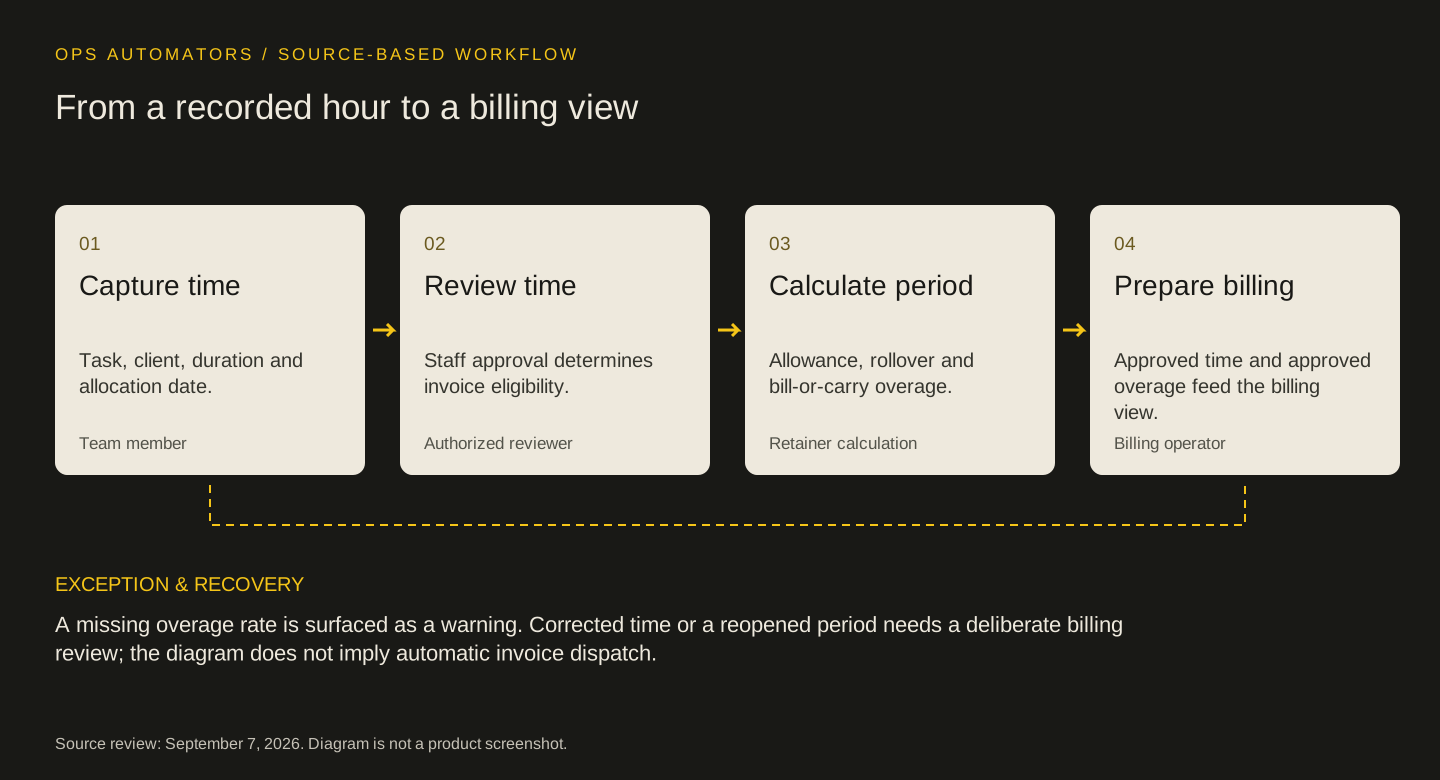
Source-based workflow
From a recorded hour to a billing view
Capture time
Task, client, duration and allocation date.
Team memberReview time
Staff approval determines invoice eligibility.
Authorized reviewerCalculate period
Allowance, rollover and bill-or-carry overage.
Retainer calculationPrepare billing
Approved time and approved overage feed the billing view.
Billing operator
A missing overage rate is surfaced as a warning. Corrected time or a reopened period needs a deliberate billing review; the diagram does not imply automatic invoice dispatch.
A budget warning is not an invoice
The budget view needs to include work that has happened even when it hasn't been approved. Invoice preparation has a different boundary. The reviewed billing calculation filters time-and-materials entries to approved time and uses approved overage for retainer billing.
This is a small implementation detail with a real consequence: an unapproved hour can warn the team that an allowance is nearly consumed without automatically adding that hour to the amount prepared for billing. Staff approval and client-facing publication are separate decisions.
Client visibility has its own boundary
The portal shows approved billable hours and progress on explicitly published tasks. Its queries exclude internal rates, costs and fees. Client-facing summaries are separate from internal notes. Those are implemented source controls; this review does not certify a production deployment or an independent security assessment.
The distinction matters when someone edits an internal task. Publishing the task is a separate act from approving its time. A useful acceptance check pairs an unpublished task with an approved time entry and confirms that the portal doesn't reveal it through either a row or an aggregate.
What the source can establish
The local repository contains time-entry approval logic, retainer calculations, invoice-preparation logic and portal code. Its package configuration confirms Next.js, TypeScript and a Postgres-backed application. These are checkable implementation claims.
Source inspection establishes how the features are implemented. It cannot establish time saved, the completeness of a historical migration or the recoverability of a live deployment. Those require operating records and tests against the release in use.
The workflow diagram summarizes the reviewed model. It is a conceptual explanation of the records and decisions involved.
Where buying still makes sense
Start with the billing rules, then compare tools. If an existing product can express your retainer policy, approval process and client access without a parallel ledger, configuring it may be enough. A custom build also creates maintenance work: rate changes, corrected time, period reopening and access control all need an owner.
Use the decision sheet to write one normal month and one awkward month from your own process. If the tool gives the right answer for both, the problem may be setup rather than missing software.
Keep this part
Build-or-buy billing decision sheet
Separate what was worked, what was approved and what was billed before choosing the software.
| Rule to test | Example to bring | Acceptance question |
|---|---|---|
| Rollover | Unused hours and a rollover cap | Does the next period start with the agreed allowance? |
| Overage | An agreement that carries extra hours | Is overage carried or billed, without doing both? |
| Approval | A submitted hour awaiting review | Can it affect the budget without entering the invoice? |
| Correction | Time allocated to an already closed month | Who can reopen the period and reconcile the effect? |
| Portal | Internal notes beside a client summary | Does the client see only the intended information? |
Use the example to agree the rules, then fill in the blank sheet with your own records and owners. Downloads are free; no email required.
Evidence & limits
What would substantiate an outcome?
To substantiate an efficiency result, record billing-preparation minutes per comparable period before and after adoption, including correction and review time. Report volume, period dates and exceptions. Hours released would be capacity, not cash savings.
- The feature review covers the accessible working tree, not an immutable production release.
- No client data, financial records or authenticated screenshots were used.
- Deployment status, time saved and subscription retirement need separate operating evidence.
Sources & implementation context
- Billable product website
Public product context. Feature statements here refer to the reviewed source, which may differ from the deployed release.
Implementation evidence is described above. Operating results require separate records.
How this page was prepared
AI assisted the research, drafting and conceptual artwork, helping compare source material and turn the workflow into a reusable worksheet. Feature statements were checked against the accessible Billable source. The stated sources and limitations define the evidence available. No independent expert review or client result is implied.
About the team commissioning this collectionContinue with the useful detail
Where this connects.


Your next step
Is a spreadsheet holding your real billing rules?
Bring an example of a retainer month your current tool can't calculate. We can assess whether configuration, integration or a focused application fits.