
Prove a CRM migration before you cut over
The import says complete. Sales asks why an opportunity has no account. This worked example defines the evidence for a migration decision, from the first export through the final change window.
Worked example. This is a proposed solution for a fictional operating scenario, not a client engagement. No measured results are claimed.

- The problem
- Record counts can match while owner mappings, relationships and business totals are wrong.
- The approach
- Use a source-to-target crosswalk, explicit rejection ledger and control totals for a staged migration.
- Intended outcome
- The intended outcome is an explainable go/no-go decision and a recoverable cutover. No completed client migration is implied.
Example system roles Source CRM · restricted staging store · target CRM · reconciliation report
Define what is moving
The sales team in this example is moving accounts, contacts and open opportunities between CRMs. Its earlier import treated the CSV as the specification. Unused fields, inactive owners and deleted accounts became decisions made during loading, when they were hardest to review.
Create a migration inventory first. Mark each object and field as migrate, transform, archive or exclude. Record the business owner who approved the choice. Excluding a record deliberately and failing to import it are different outcomes.
Keep an immutable source identifier on the target or in a crosswalk. A company name can change; the migration relationship should survive that change.
One account can produce several contacts, not several copies
Load parent records before dependents. For each source account ID, retain its target account ID and load status. A contact whose parent hasn't loaded stays in a rejection ledger with the reason and repair owner. Don't create a placeholder company silently.
Owner mappings need the same treatment. Map a departed employee to an approved successor or an explicit holding owner. Unknown picklist values should be reviewed; defaulting every unknown opportunity to an open stage can distort pipeline reporting.
Normalize types deliberately. Preserve currency alongside amounts, distinguish date-only fields from timestamps and document how blanks differ from zero. A transformation rule belongs in the mapping sheet so the business can review it.
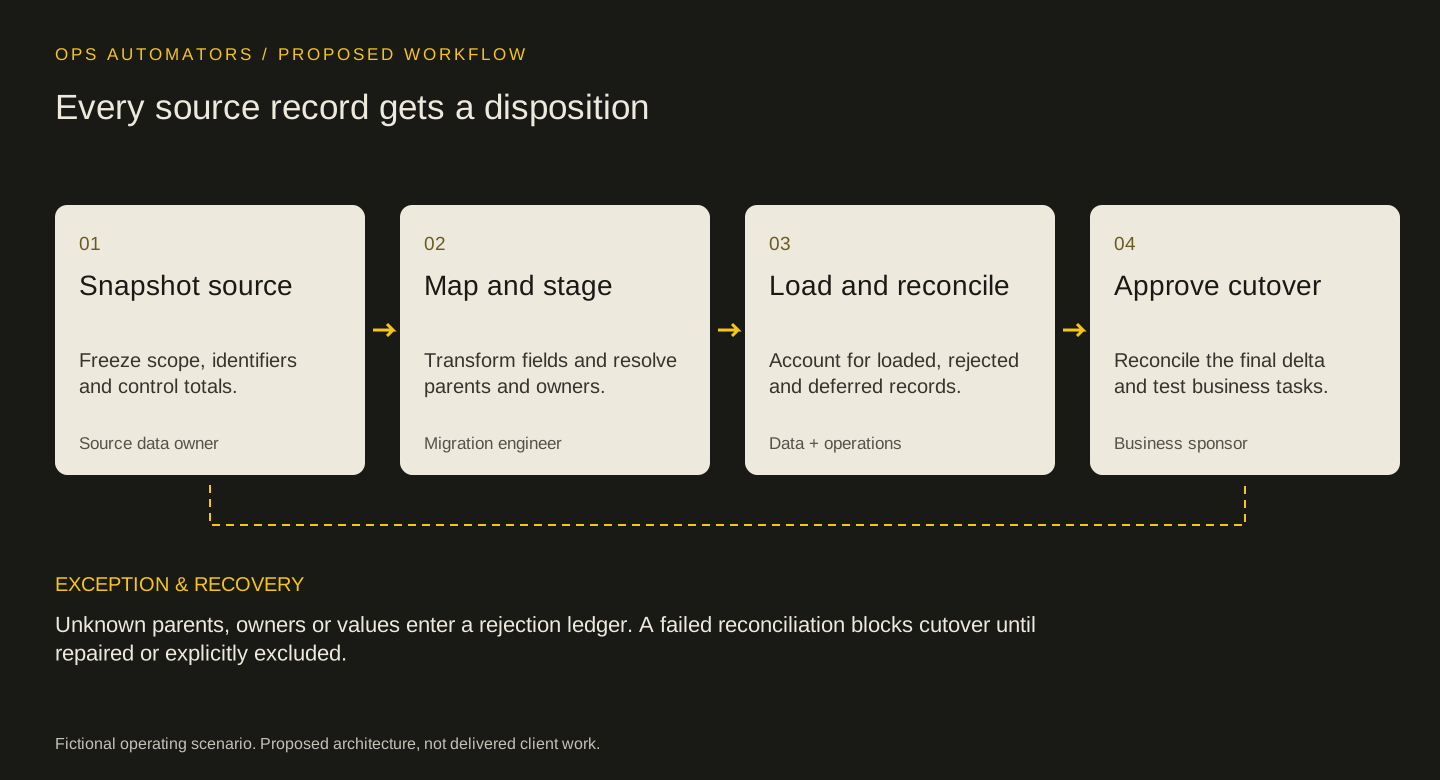
Proposed workflow
Every source record gets a disposition
Snapshot source
Freeze scope, identifiers and control totals.
Source data ownerMap and stage
Transform fields and resolve parents and owners.
Migration engineerLoad and reconcile
Account for loaded, rejected and deferred records.
Data + operationsApprove cutover
Reconcile the final delta and test business tasks.
Business sponsor
Unknown parents, owners or values enter a rejection ledger. A failed reconciliation blocks cutover until repaired or explicitly excluded.
Reconcile at more than one level
Record counts are the first control, not the only control. Reconcile eligible source records to loaded, rejected and deliberately deferred records. Then compare relationships, required-field coverage and business totals using the same inclusion rules on both sides.
For open opportunities, compare amounts by currency and stage. Do not add unlike currencies into a convenient total. Review a sample of transformed records, including special characters, long notes and inactive owners. Verify what users can see, not just what an administrator imported.
If a deduplication policy merges two source records into one target, keep both source IDs in the crosswalk and explain the count difference. A lower target count is acceptable only when the disposition is known.
The last change window is a separate migration
Agree how writes behave during cutover. Either pause writes in the source for an agreed window or capture and reconcile a bounded delta. Record the export watermark and the final accepted change. An unbounded last-minute export makes the baseline impossible to reproduce.
Keep the source readable and define who can authorize rollback. Reverting is straightforward only while new target writes can be accounted for. Once users edit both systems, restoration requires a reconciliation plan, not a switch.
The go/no-go review should include sales operations, the data owner and someone who will use the target for ordinary work. Test creating a lead, assigning an owner and producing the key pipeline report.
Keep the source export, mapping version and reconciliation output together under restricted access. The migration owner sets a retention date after acceptance; keeping a staging copy forever should not be the accidental default.
A useful stopping rule
Don't cut over with unexplained rejected rows or missing parent relationships in the agreed scope. An approved exclusion can remain outside the migration, but it needs a durable reason and an owner. The target system should open with a known backlog rather than a hidden loss.
Keep this part
Migration go/no-go worksheet
A migration is ready when every difference has an explanation the data owner accepts.
| Control | How to check | Go/no-go evidence |
|---|---|---|
| Record disposition | Eligible source = loaded + rejected + deferred | Every difference has a reason |
| Parent relationships | Join contacts and deals through source/target crosswalk | No unexplained missing parents |
| Owner coverage | Compare source owner to approved target map | Holding owner is deliberate |
| Pipeline totals | Compare amount by stage and currency | Differences reconcile to approved transformations |
| Final delta | Compare changes after the export watermark | No unaccounted changes |
| Business acceptance | Run representative user tasks | Named owner records acceptance |
Use the example to agree the rules, then fill in the blank sheet with your own records and owners. Downloads are free; no email required.
Evidence & limits
How to evaluate the proposal
Use a frozen export and a dated target snapshot. Report the migration scope, merge rules, rejected records and reconciliation differences. Import duration alone is not evidence of migration quality.
- The mapping must be adapted to the source and target CRM editions and object models.
- Rollback after target writes requires an explicit change-reconciliation procedure.
Sources & implementation context
- HubSpot: CRM data migration
Vendor guidance on source inventory, field mapping and integration dependencies.
The design decisions and worksheets are original worked-example material. Vendor documentation supports specific platform behavior, not a claim that this implementation has been delivered.
How this page was prepared
AI assisted the research, drafting and conceptual artwork, helping compare source material and turn the workflow into a reusable worksheet. The scenario is fictional and the design is a proposal. The stated sources and limitations define the evidence available. No independent expert review or client result is implied.
About the team commissioning this collectionContinue with the useful detail
Where this connects.


Your next step
Can you account for every record before cutover?
Share the object list and a redacted mapping sheet. We can define the rehearsal, reconciliation and cutover gates.