
Commission dashboard: trace the payout back to the deal
When commissions depend on fragile spreadsheets, a rep cannot easily explain their number and finance cannot reliably trace a change. A shared application makes the calculation and review visible.
A fictional operating scenario and proposed solution. No named organization or measured customer result is represented.

- The problem
- When commissions depend on fragile spreadsheets, a rep cannot easily explain their number and finance cannot reliably trace a change. A shared application makes the calculation and review visible.
- The approach
- Review credited deals → Inspect calculations and adjustments → Prepare a payout preview for review.
- Intended outcome
- A rep can understand their earnings and a finance reviewer can inspect the exact amount proposed for payout.
Example system roles Custom application · connected business records · explicit rules · human review
Interactive sample
Fictional data · changes reset when you leave
Follow the number from deal to payout
Switch to Finance, apply a sample adjustment, and prepare a preview. Paid deals are excluded from the payable amount.
$24,000.00 × 8% = $1,920.00
$12,000.00 × 6% = $720.00
$8,000.00 × 8% = $640.00
Sample adjustments must be between −$10,000 and $10,000. A negative review amount cannot be prepared for payout.
The sample uses fictional deals and a simplified commission calculation. It demonstrates review and adjustment, not the original settlement engine. No money is moved.
Put the calculation in view
In this scenario, commission calculations have grown across several spreadsheet tabs. Finance can produce a total, but explaining a correction means reconstructing the deal history.
A shared earnings view keeps the credited deal, applicable rate, calculated commission, adjustment, and payment status together. The rep and finance team see different controls over the same underlying records.
Separate preparation from payment
A payout preview lists the unpaid records and adjustments that make up the amount. Previously paid deals remain visible for context but do not re-enter the payable total.
If an amount changes after the preview is prepared, the preview must be reviewed again. The sample demonstrates that boundary by invalidating the preview whenever an adjustment changes.
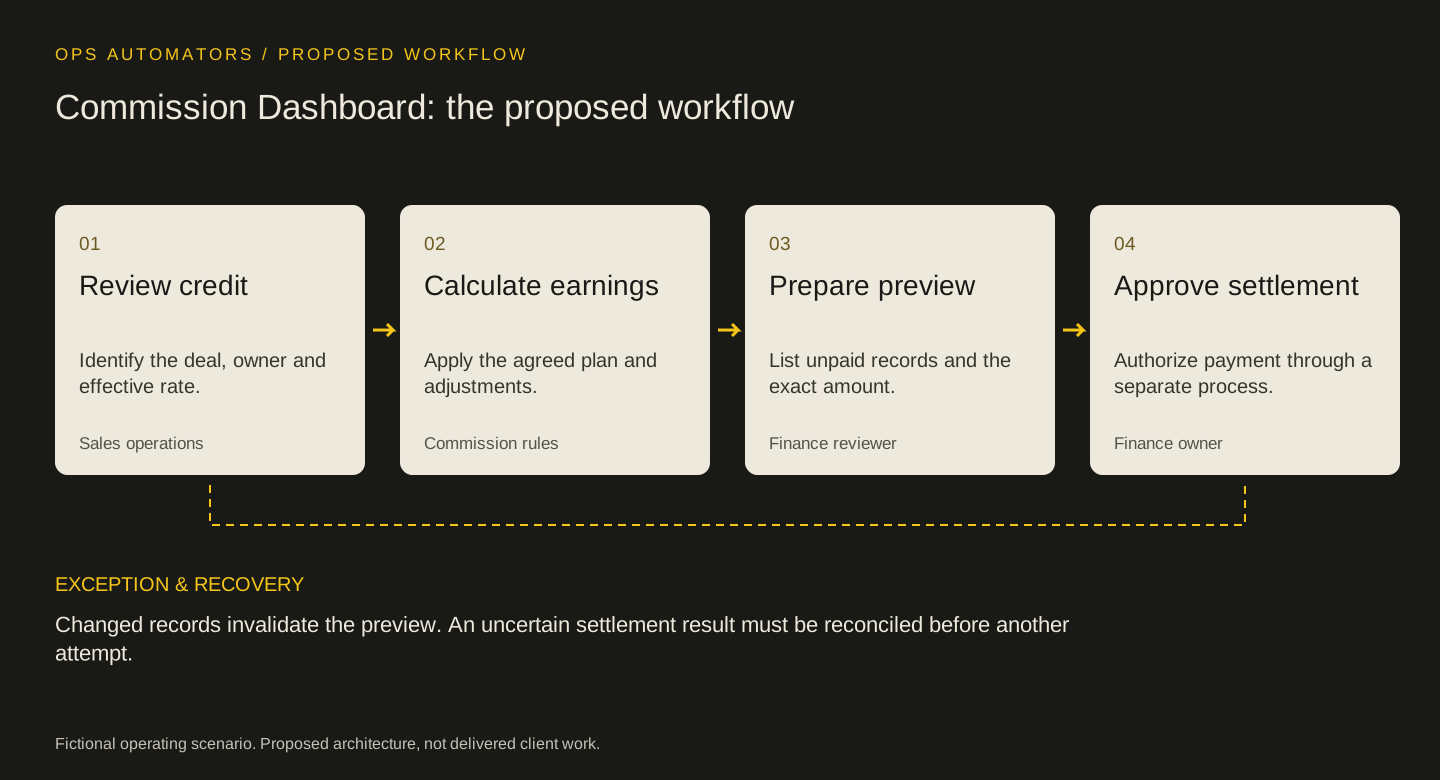
Proposed workflow
Commission Dashboard: the proposed workflow
Review credit
Identify the deal, owner and effective rate.
Sales operationsCalculate earnings
Apply the agreed plan and adjustments.
Commission rulesPrepare preview
List unpaid records and the exact amount.
Finance reviewerApprove settlement
Authorize payment through a separate process.
Finance owner
Changed records invalidate the preview. An uncertain settlement result must be reconciled before another attempt.
Make corrections deliberate
Real commission rules may include splits, reversals, thresholds, and currency conversion. Each belongs in an agreed policy with an effective date and an owner.
For a connected system, an uncertain payment result needs investigation before retry. A successful screen interaction alone cannot establish that a financial operation completed downstream.
Keep this part
Commission Dashboard decision sheet
Every payout total should be explainable through its records, rules, adjustments, and review state.
| Situation to test | Expected behavior | Review and ownership |
|---|---|---|
| Previously paid deal | Visible but excluded from payable total | Finance verifies payment status |
| Adjustment after preview | Preview becomes invalid | Reviewer prepares a new preview |
| Uncertain settlement | Hold further action | Finance reconciles the downstream result |
Use the example to agree the rules, then fill in the blank sheet with your own records and owners. Downloads are free; no email required.
Evidence & limits
How to evaluate the proposal
During a pilot, reconcile preview totals against an approved reference calculation and record unexplained differences. Track review time and correction frequency; this example reports no financial results.
- The sample uses fictional deals and a simplified commission calculation. It demonstrates review and adjustment, not the original settlement engine. No money is moved.
- Implementation depends on source data, access rules, and policies agreed with the responsible team.
The design decisions and worksheets are original worked-example material. Vendor documentation supports specific platform behavior, not a claim that this implementation has been delivered.
How this page was prepared
AI assisted the research, drafting and conceptual artwork, helping compare source material and turn the workflow into a reusable worksheet. The scenario is fictional and the design is a proposal. The stated sources and limitations define the evidence available. No independent expert review or client result is implied.
About the team commissioning this collectionContinue with the useful detail
Where this connects.


Your next step
How long does a commission dispute take to settle?
Bring a redacted plan and one payout a rep questioned. We can trace the credit rules and the review path behind the number.