
Consultant portfolio: see stalled work across delivery tools
A consultant's project context lives across CRM, tickets, conversations, meetings, and time records. Preparing a useful status view means piecing those sources together repeatedly.
A fictional operating scenario and proposed solution. No named organization or measured customer result is represented.

- The problem
- A consultant's project context lives across CRM, tickets, conversations, meetings, and time records. Preparing a useful status view means piecing those sources together repeatedly.
- The approach
- Bring project signals into one view → Identify stalled or at-risk work → Follow the next action to its source.
- Intended outcome
- A consultant can identify a project needing attention and follow the next action back to its source.
Example system roles Custom application · connected business records · explicit rules · human review
Bring the signals into one view
A consultant owns several projects, with commercial context in a CRM, delivery work in tickets, decisions in meeting notes, and effort in time records. Preparing a status view means reconnecting those facts.
The proposed dashboard gathers the relevant signals around each project. A snapshot time and source link accompany the summary so a reviewer can see what is current and investigate further.
Show what stalled and why
A red status is not an action. A useful card identifies the dependency, the person who can move it, and the evidence supporting that conclusion.
Keep a missing source distinct from an actual delivery problem. If the time system is unavailable, say that effort data is unavailable rather than implying that no time was logged.
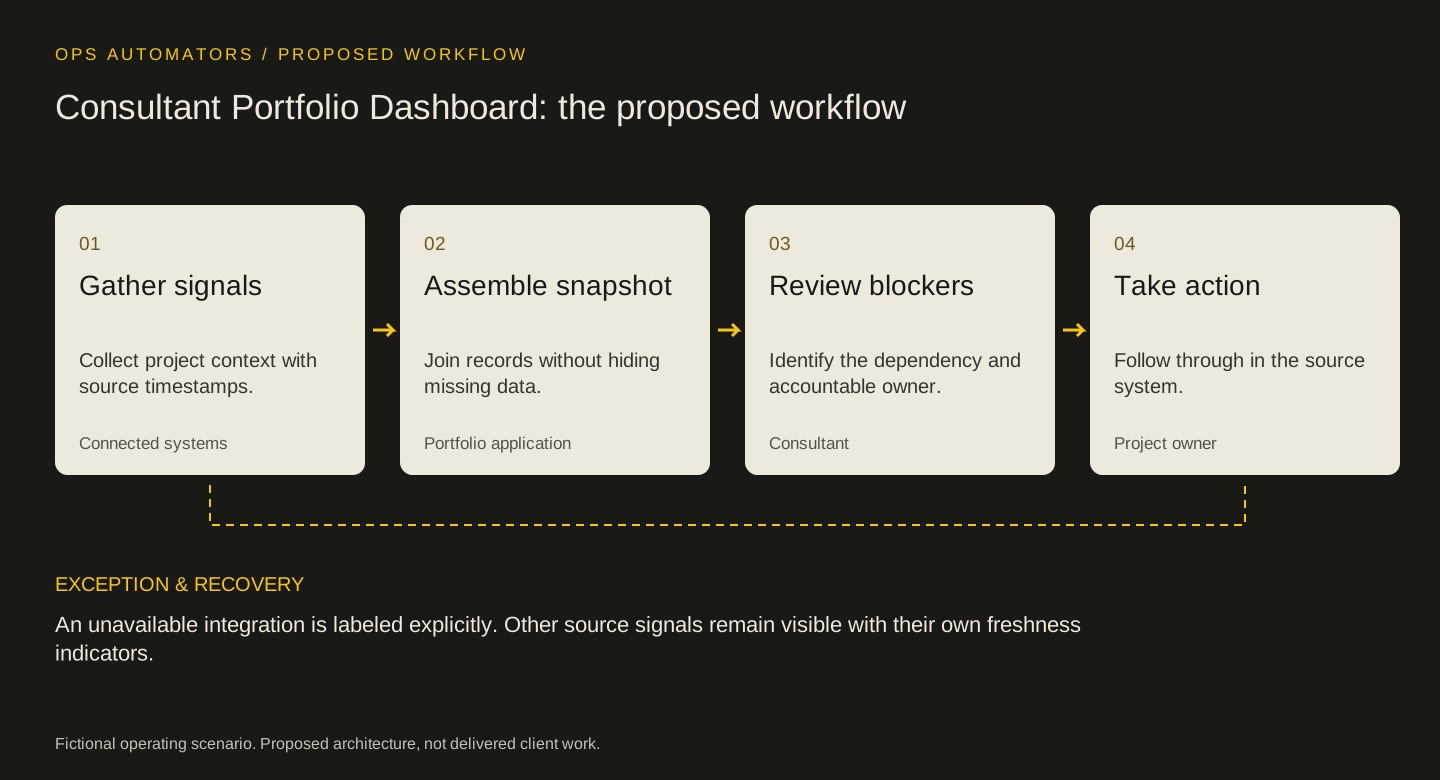
Proposed workflow
Consultant Portfolio Dashboard: the proposed workflow
Gather signals
Collect project context with source timestamps.
Connected systemsAssemble snapshot
Join records without hiding missing data.
Portfolio applicationReview blockers
Identify the dependency and accountable owner.
ConsultantTake action
Follow through in the source system.
Project owner
An unavailable integration is labeled explicitly. Other source signals remain visible with their own freshness indicators.
Read first, act in the source
A read-only starting point lets the team validate the combined view before introducing cross-system updates. The next action opens the relevant source record for the accountable owner.
Test stale snapshots, conflicting ownership, and one unavailable integration. The portfolio should retain useful context while making those limits visible.
Keep this part
Consultant Portfolio Dashboard decision sheet
A combined portfolio is useful when each concern leads to evidence, an owner, and a next action.
| Situation to test | Expected behavior | Review and ownership |
|---|---|---|
| Stale snapshot | Display the last refresh time | Consultant verifies before acting |
| Unavailable source | Keep other signals visible | Integration owner restores access |
| Conflicting owners | Show the discrepancy | Project lead confirms accountability |
Use the example to agree the rules, then fill in the blank sheet with your own records and owners. Downloads are free; no email required.
Evidence & limits
How to evaluate the proposal
Measure status-preparation time and the proportion of flagged blockers with a confirmed owner. Test source freshness and reconciliation independently; no delivery-performance improvement is claimed.
- This worked example is a proposed design, not access to a production application.
- Implementation depends on source data, access rules, and policies agreed with the responsible team.
The design decisions and worksheets are original worked-example material. Vendor documentation supports specific platform behavior, not a claim that this implementation has been delivered.
How this page was prepared
AI assisted the research, drafting and conceptual artwork, helping compare source material and turn the workflow into a reusable worksheet. The scenario is fictional and the design is a proposal. The stated sources and limitations define the evidence available. No independent expert review or client result is implied.
About the team commissioning this collectionContinue with the useful detail
Where this connects.


Your next step
Which project stalled without anyone noticing?
Bring your delivery tools and a project that drifted. We can define the health signals and where they belong in one view.