
Customer success: turn account signals into a clear next action
A healthy-looking account can still be drifting. Customer success teams need a priority queue that explains the risk, rather than another dashboard to interpret.
A fictional operating scenario and proposed solution. No named organization or measured customer result is represented.

- The problem
- A healthy-looking account can still be drifting. Customer success teams need a priority queue that explains the risk, rather than another dashboard to interpret.
- The approach
- Identify accounts that need attention → Inspect health and contact history → Choose a recovery or expansion playbook.
- Intended outcome
- An account owner can explain why a record needs attention and identify the next recovery step.
Example system roles Custom application · connected business records · explicit rules · human review
Interactive sample
Fictional data · changes reset when you leave
Who needs attention today?
Try “Contact overdue.” Open an account and add its playbook to the sample focus list.
Software · $4,200.00 MRR
Contact overdueProfessional services · $6,800.00 MRR
Adoption riskSoftware · $3,100.00 MRR
HealthyAgency · $2,600.00 MRR
Contact overdueAccount 01 · priority explained
Healthy usage, but no recorded contact in 48 days.
Suggested playbook
- Review the last conversation
- Confirm the account owner
- Schedule a relationship check-in
The interactive sample uses fictional accounts and simplified priority rules. Playbook selections stay in this browser session and do not update a CRM.
Start with a decision, not a score
In this scenario, a customer success manager reviews a mixed portfolio. Some accounts have weak adoption. Others look healthy but have not had a meaningful conversation in weeks. A single health score conceals that difference.
The queue separates the reason for attention from the health measure. The manager can distinguish a usage problem from a relationship gap before deciding what to do.
Keep the evidence beside the priority
Each account shows its health measure, last contact, owner, and the rule that brought it into the queue. A contact threshold is an operating policy to agree with the team; it is not a universal sign of churn.
Opening an account reveals a short playbook. The owner chooses whether the recommended steps fit the relationship. Adding an item to a focus list is separate from changing a CRM record.
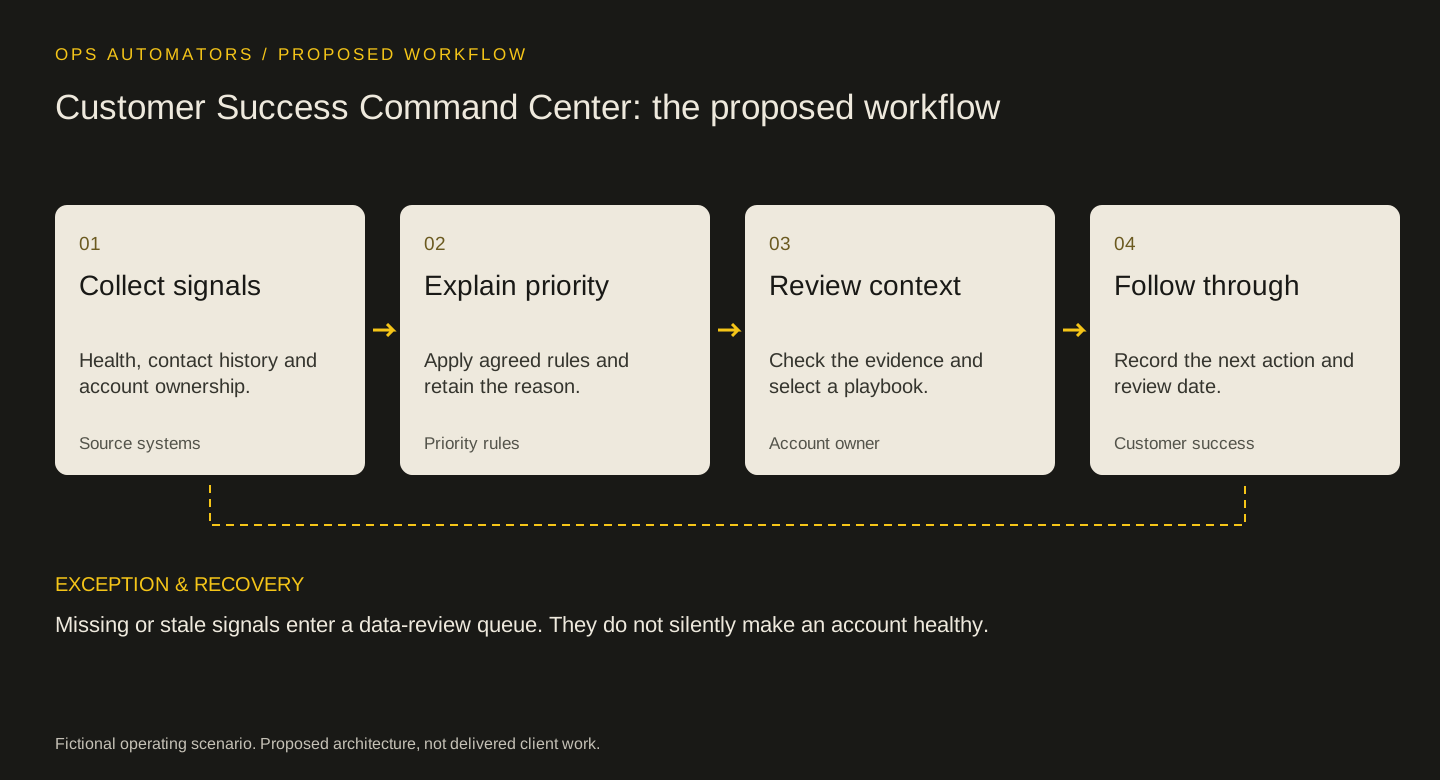
Proposed workflow
Customer Success Command Center: the proposed workflow
Collect signals
Health, contact history and account ownership.
Source systemsExplain priority
Apply agreed rules and retain the reason.
Priority rulesReview context
Check the evidence and select a playbook.
Account ownerFollow through
Record the next action and review date.
Customer success
Missing or stale signals enter a data-review queue. They do not silently make an account healthy.
Missing information is its own condition
A missing contact timestamp should not become a healthy zero-day value. Label the gap and route it for correction. The same principle applies when an adoption feed is stale.
Before launch, test an account with strong usage and overdue contact, one with recent contact but poor adoption, and one with no reliable data. Each should produce a distinct explanation.
Keep this part
Customer Success Command Center decision sheet
A useful priority queue explains the reason for attention and names the owner of the next action.
| Situation to test | Expected behavior | Review and ownership |
|---|---|---|
| Strong usage, overdue contact | Relationship check-in | Account owner confirms the next contact |
| Low adoption, recent contact | Recovery review | Owner agrees an adoption goal |
| Missing contact history | Data review | Owner verifies the source before acting |
Use the example to agree the rules, then fill in the blank sheet with your own records and owners. Downloads are free; no email required.
Evidence & limits
How to evaluate the proposal
Compare the time required to explain a priority, the proportion of flagged accounts with an owner, and overdue follow-up before and after a pilot. These are proposed measures, not reported outcomes.
- The interactive sample uses fictional accounts and simplified priority rules. Playbook selections stay in this browser session and do not update a CRM.
- Implementation depends on source data, access rules, and policies agreed with the responsible team.
The design decisions and worksheets are original worked-example material. Vendor documentation supports specific platform behavior, not a claim that this implementation has been delivered.
How this page was prepared
AI assisted the research, drafting and conceptual artwork, helping compare source material and turn the workflow into a reusable worksheet. The scenario is fictional and the design is a proposal. The stated sources and limitations define the evidence available. No independent expert review or client result is implied.
About the team commissioning this collectionContinue with the useful detail
Where this connects.


Your next step
Which warning sign does your team keep catching late?
Bring the signals you already track and one account that churned anyway. We can map what a review queue has to surface, and who acts on it.